
Experts have already mentioned it on several occasions, the era of AI dominance is about to arrive in the coming years and the changes are already being seen. Concern about unemployment? In fact, it has been confirmed that ChatGPT, Gemini, Copilot and other chatbots are the ones that will help you keep your job.
It must be remembered that these virtual assistants have been created mainly to serve as support in terms of productivity, improvement of skills and versatility in tasksas long as there is no dependency, its characteristics will be very helpful.
The problem for some of the users of the OpenAI project is that they realize that adapting quickly to a technology like this It is not as simple as many make it out to be.Well, you have to understand how it works. It is not worth saying that “it is just about asking questions and that’s it”, in a simple perspective, yes, but it has its trick and complexity when everything revolves around the prompts.
How does ChatGPT work and what can it do for you?
Computer Today
ChatGPT is a chatbot developed by OpenAI and with its system you have the possibility of asking practically any question to obtain answers based on context, information on the Internet or reasoning opinions from the neural network it has.
First it is important to understand that you can use this tool without spending a single eurobut this free plan has many limitations that prevent you from taking full advantage of it. The main options are Pro and Plus, both with different benefits for everyday use, such as access to more AI models, features, and fewer restrictions.
The price is around 18 euros or 180 eurosrespectively, with the Pro option being the most recommended for its benefits and affordable value. Well, whatever way you want to use it, even with the free one, you will be able to do incredible things.
In itself, it has two main elements. What you will see first after logging in will be the bar. “Ask whatever you want” where you can start talking to artificial intelligence via message or requesting specific things with strategic prompts. Right in this section you have three more elements, one on the left that displays focus options:
- Create an image: Assume that your objective is to generate an image through text.
- Think More: activates the chatbot’s higher reasoning and analysis mode. Ideal for more complex tasks or longer answers.
- In-depth research: to get information with reliable sources and good arguments about events, news and similar things.
- Study and learn: gather relevant information through the conversations you have to better adapt to the way you use AI, being more personalized, useful and consistent with respect to context.
- Internet search: to use ChatGPT as if it were Google or another search engine.
- Canvas or Canvas: It is perfect for creating, editing or improving sketches, text and code.
On the right side of that same element you have Audio Mode that works as if you were talking on WhatsApp with the notesbut aimed at AI and the other thing is the Voice/Vision Mode with which you have the conversation in real time with the chatbot.
Now, on the left side of the interface you have the toolbar. From here you can create a New Chat, Search Chatssee the Library of photos u organize Projects to split chats depending on the topics or focus activities you want to do.
Followed by that is the history of the most recent conversations and, at the end, the profile options where you access the Configuration or membership changes. We must not leave aside that segmented message icon that appears in the upper right corner of the screen, since it is the Chat Temporalknown for allowing you to talk to the AI and then automatically self-destruct the conversation.
How to configure ChatGPT from scratch for a better experience
Computer Today
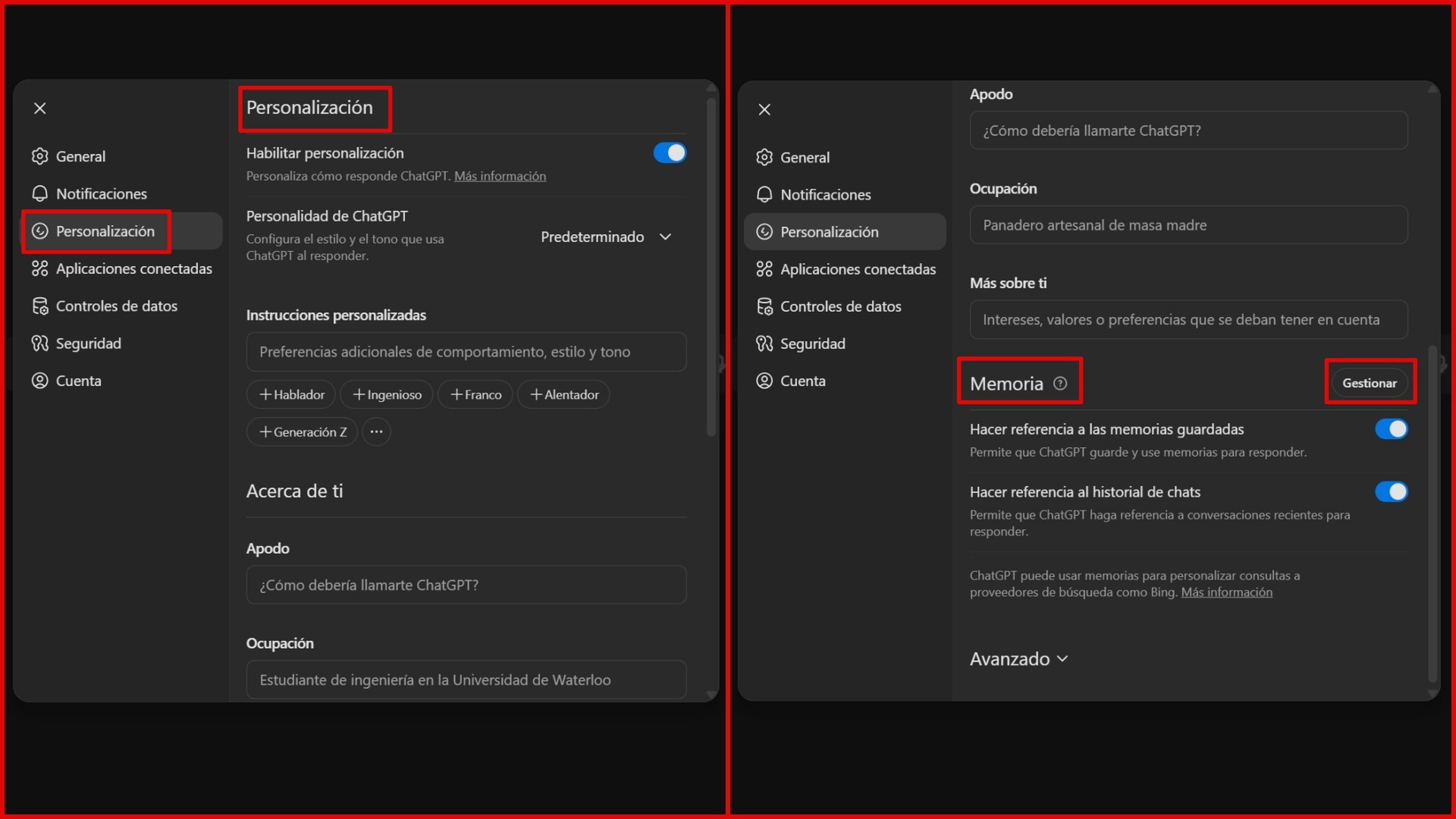
At this point you already know the ChatGPT interface and what each thing is for, but you can do something else to improve your experience and that is by going to Configuration. You can customize many things, starting with the section General in which modifications of the Theme, Language and the Voice what you hear in real-time conversation mode.
Another thing that is recommended is to go to the section Personalization to Enable Personalization depth of the chatbot. That is, changing the way they interact with you and the focus of the questions. As you can see in the form, it is possible to edit how you communicate between cynic, Robot, Attas, Friki y Default.
On the other hand, there are the Instructions Customized and information about Nickname, Occupation and relevant details you should consider, as well as tones. In this same configuration section, you have the ability to enable the Memory of Reference Chat History y Make Reference to Saved Memories so that you remember past conversations or specific things.
Likewise, these data stored in memory can be modified to be deleted or added from the button Manage. As a last recommendation, in Securityactivate the Multifactor Authentication to protect all data.
Remember that to achieve high quality results, the real trick that can help you is ttry to give context and be specific in the details about the indication. Sam Altman, CEO of OpenAI, often shares advice in interviews and his X account, as does Greg Brockman who talks about the proper use of AI models.
In the future, managing these AI programs will be as important as Word, Excel and other office apps, they will practically become essential skills for most activities, both student, work and daily, so waiting longer without obtaining this learning is only a disadvantage.
Get to know how we work in NoticiasVE.
Tags: Tips, Artificial intelligence, Tutorial